
The giant cat clips that keep showing up on TikTok all play the same joke: a perfectly ordinary house cat, suddenly the size of an office block, strolling down a busy street like it owns the place. You can make your own version with one photo of your cat. No prompt writing, no editing app.
Short version: upload a clear, full-body photo of your cat on the Make It Giant AI homepage, type something like "my grey tabby" in the subject box, pick one of four city scenes and generate. Your first preview is free after signing in. A full 10-second, 720p vertical clip is $4.99.
Two kinds of giant cat video
It helps to know which version you are after, because tools online make different things under the same name.
| Version | How it works | What you control |
|---|---|---|
| Template remake | Your cat is swapped into a fixed viral clip (a subway, a New York avenue) | Only the photo |
| Prompt-built scene | You write a long prompt and stitch shots yourself | Everything, and it takes hours |
| Scene preset (what we do) | Your photo plus a short subject line and one of four city scenes | Photo, subject line, scene |
We sit in the middle. You will not get a three-shot story with screaming crowds and helicopters, and we do not pretend you will. You get one continuous shot of your cat growing huge and walking through a city, which is the bit most people screenshot anyway.
Pick the right cat photo
This decides more than anything else. The model keeps the colors and markings it can see, so give it a good look at your cat.
- Whole body in frame. A face-only close-up leaves the model guessing about legs and tail, and the walk looks odd.
- Side or three-quarter view. Cats photographed head-on from above (the classic "cat looking up at you from the floor") come out squat.
- Eyes open, in focus, decent daylight. Night shots with flash flatten the fur.
- Plain floor or wall behind. The city comes from the scene, so the background in your photo is not needed and a messy one can confuse the edges.
- Only one animal. If two cats share the photo, crop to the one you want.
Stripes, tuxedo patches and eye color can only carry over if they are clearly visible in your photo. Very fluffy long-haired cats can lose some definition at the edges at 480p, so check the preview before paying.
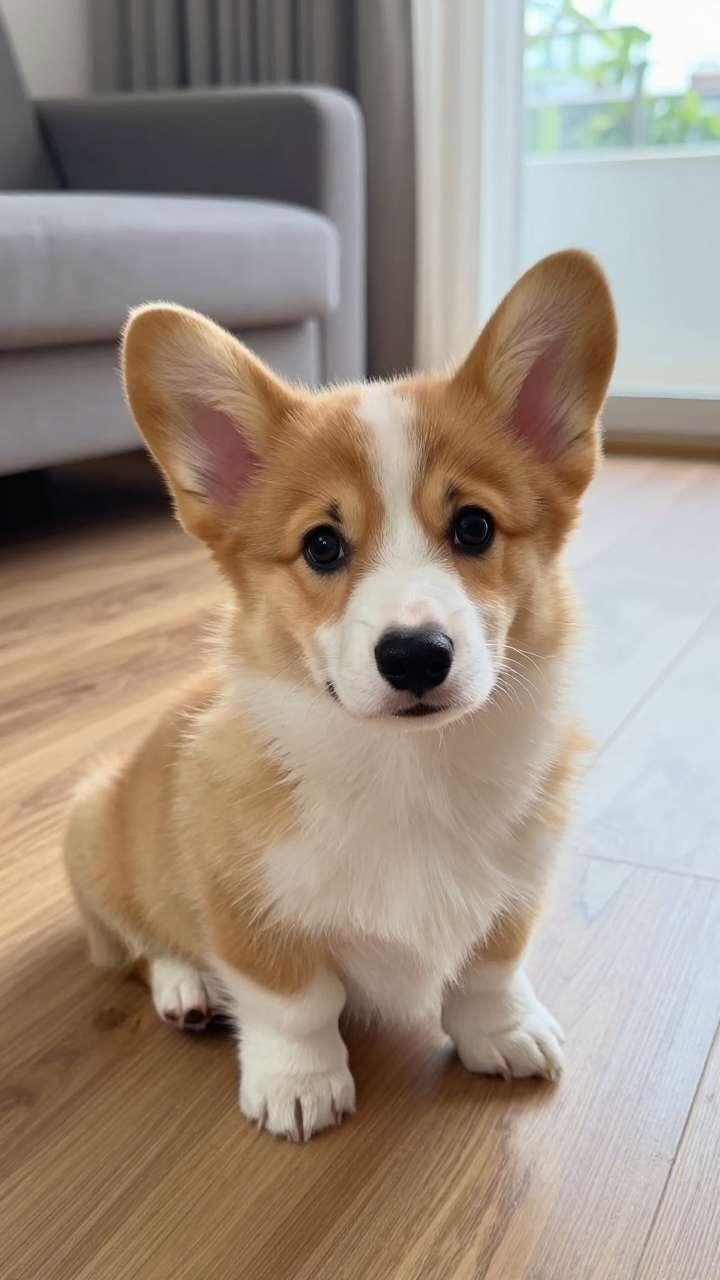
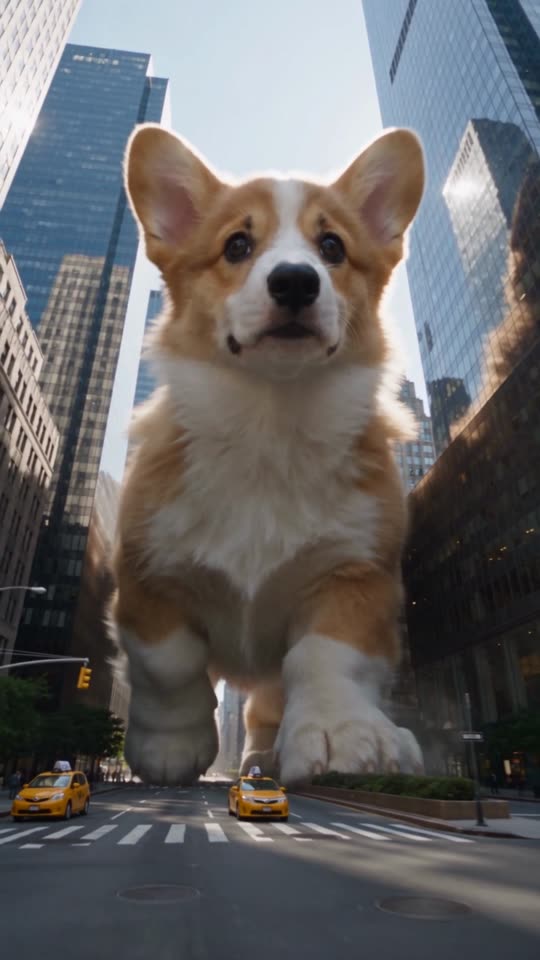
The pair above is a dog from our example gallery, not a cat, but it shows the kind of input that works: side-on, full body, plain floor. Same rules apply to your cat.
Step by step
- Go to the homepage generator and upload one JPEG, PNG or WebP, up to 10MB.
- In the subject box (40 characters max) describe the cat plainly: "my ginger cat", "black cat with white paws". Skip the jokes here, they do not help the model.
- Choose a scene: City street day, Night city neon, Beach town or Snowy city. Snow suits dark-furred cats because the contrast reads well on a phone screen. Neon night can swallow detail on a black cat, so try day city first if yours is dark.
- Tick the consent box. The tool is for animals and objects, not portraits of real people.
- Sign in and generate. The first time, you get the free preview.
Free preview vs paid clip
New accounts get one preview after signing in: 480p, 4 seconds, watermarked, and it plays in the browser only. Signing out and back in does not reset it. Its job is to show you whether your cat still looks like your cat at giant scale.
If it does, the paid version is one flat price on the pricing page: $4.99 buys 10 credits, which is one 10-second, 720p, 9:16 MP4 with no watermark and a download button. No subscription, no bundles. Credits do not expire, and if a generation fails the credits come back automatically.
Posting it
The clip is already vertical, so it drops straight into TikTok, Reels or Shorts. Add your own sound in the app, since the video has none of the crowd screams the template versions use. A caption that names your cat tends to work better than a generic "giant cat" line, because the whole point is that it is your cat. Our TikTok guide has a few more posting notes.
One thing to keep in mind: platforms increasingly label AI video. Leave the AI label on if the app asks. Nobody is fooled by a 40-story cat anyway.
FAQ
Can I make a giant cat AI video for free?
Yes, once. New accounts get a free 4-second, 480p preview with a watermark after signing in. The full 10-second 720p clip without watermark costs $4.99.
Does it work with a photo of me holding my cat?
Crop to just the cat. The tool is built for pets and objects and does not accept portraits of real people.
Can I choose where my cat walks?
You can pick one of four scenes: day city, neon night, beach town or snowy city. The camera path is set by us.
How long is the video?
Paid clips are 10 seconds, 720p, vertical 9:16. The free preview is 4 seconds at 480p.
What if the result looks wrong?
If the generation fails, credits are refunded automatically. If it finished but you do not like it, try a clearer, full-body photo before generating again.
Share