
Scroll short-form video for ten minutes and you will probably hit one: a cat leaning on a skyscraper, a man sitting on a bridge like it is a park bench, a sneaker stomping past a bus stop. "Giant AI videos" is the loose name for all of these. The joke is old (people have been making giant monsters on screen since the 1950s) but AI video made it something anyone can do with one photo.
This post explains the formats, why they keep working, and how to make one without spending an afternoon on prompts.
The three formats
Giant pets. The biggest group. A house cat or dog, unchanged except for size, walking through a city or sitting in traffic. It works because the animal is calm and familiar and everything around it is chaos. Owners use their own pets, which makes each version personal.
Giant people. A person, often the creator, scaled up to building height in everyday places: a classroom, a beach, a stadium. These lean on escalating locations and quick cuts. They usually need a face that stays consistent across shots, which is harder to get right.
Giant objects. Sneakers, toys, rubber ducks, soda cans. Brands like this one because it turns a product shot into a hook without building a set. A plush toy wandering down a snowy avenue reads as cute; a sneaker crossing a street reads as a drop teaser.
Why they spread
A few reasons come up again and again when people break these clips down:
- Scale contrast is instant. You understand the joke before the first second ends, which matters on a feed where people swipe fast.
- No dialogue needed, so the same clip travels across languages.
- It is easy to remix. Everyone has a pet or a favorite object, so viewers become makers.
- The calm subject sells it. A giant cat that just looks mildly curious is funnier than one smashing things.
Making one from a single photo
Most tools for this fall into two camps. Template sites swap your photo into a fixed viral clip. General video models let you write long prompts and build the scene yourself, which can look great but takes trial and error.
Make It Giant AI is a narrow tool in between, built for the giant pet and giant object formats:
- Upload one photo of a pet, toy or product (JPEG, PNG or WebP, up to 10MB).
- Optionally name the subject in up to 40 characters, for example "rubber duck" or "my corgi".
- Pick a scene: City street day, Night city neon, Beach town or Snowy city.
- Sign in and generate. The giant motion and lighting are applied on our side, so there is no model to choose and no prompt to write.
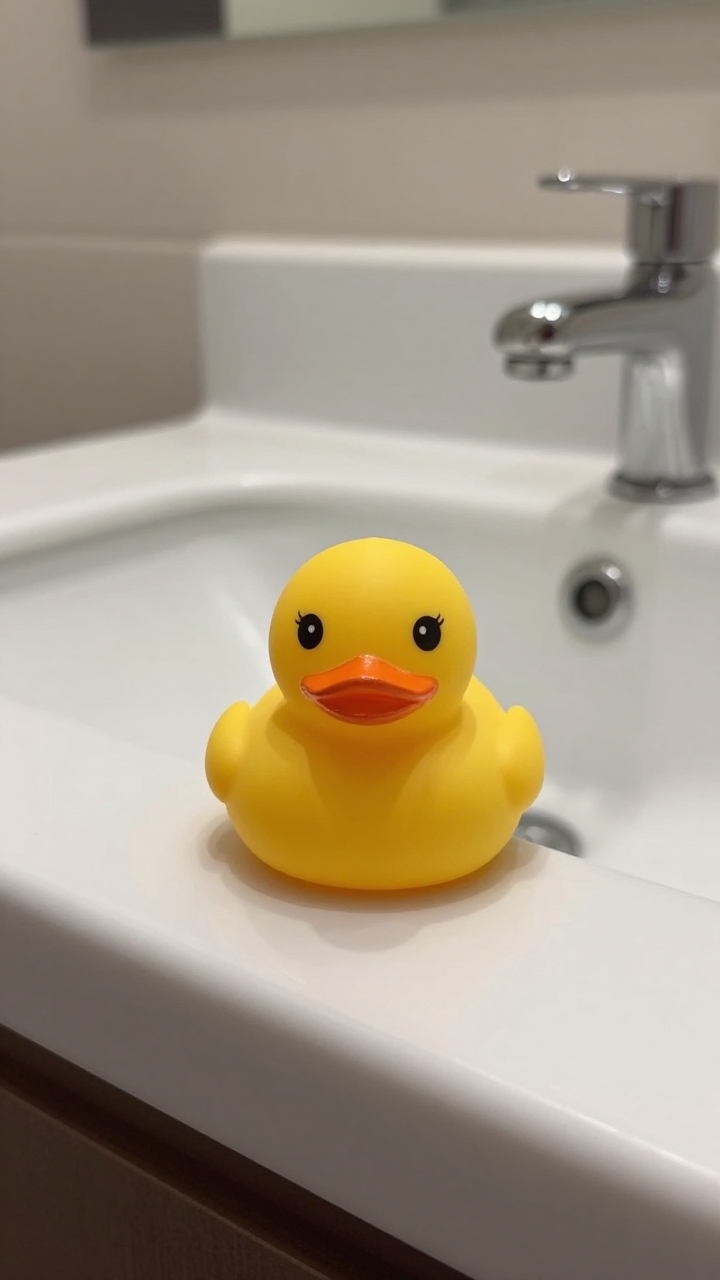
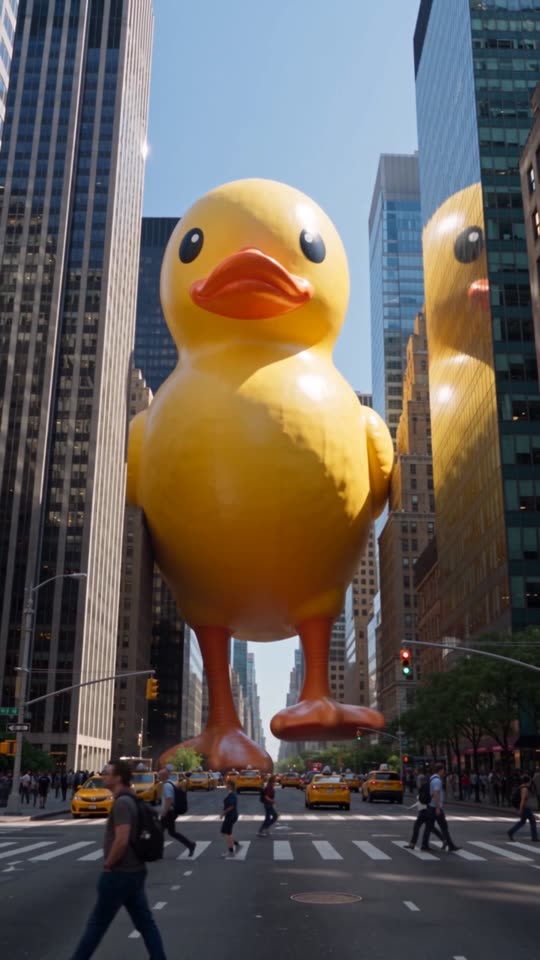
That duck is from our example gallery: one product-style photo in, one giant-in-the-city clip out.
What we do not do, so you can decide quickly: we do not make giant people from portraits (the tool is for animals and objects), we do not do multi-shot stories, and the clip has no sound. You add music or trending audio in the app you post to.
What it costs
New accounts get one free preview after signing in: 480p, 4 seconds, watermarked, plays in the browser. That is enough to see whether your subject holds up at giant scale. The full clip is one flat price on the pricing page: $4.99 for 10 credits, which equals one 10-second, 720p, 9:16 MP4 with no watermark. No subscription. Failed generations refund the credits automatically, and unused credits do not expire.
A few tips from looking at what works
- Keep the whole subject in the photo. Cropped feet or paws make the walk look strange.
- Plain background in, busy city out. The scene provides the city.
- Contrast matters on small screens: a dark object reads better on the snowy scene, a light one on neon night.
- Post the clip with a caption that names the subject. "Biscuit has entered downtown" lands better than "giant dog AI".
If you want ideas for which subject to try first, our guide to giant animal videos compares cats, dogs, small pets and toys.
FAQ
What is a giant AI video?
A short clip, usually vertical, where AI makes a pet, person or object enormous inside a real-looking place such as a city street.
Can I make myself giant with Make It Giant AI?
No. The tool works with photos of pets, toys and objects and does not accept real-person portraits.
Do I need to write a prompt?
No. You upload a photo, add an optional 40-character subject line and pick one of four scenes.
Is it free?
One preview per new account is free (480p, 4 seconds, watermark). A full clip is $4.99.
Share